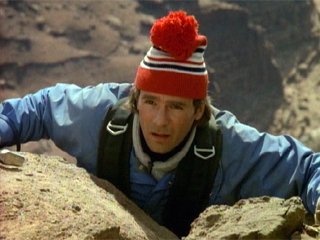
Mac's Red Bobble Hat
  Reply to this topic Start new topic Start Poll
Track this topic | Email this topic | Print this topic
Makedde
Posted: 21 December 2011 - 10:01 PM                                    
Quote Post


DXS Operative
****

Posts: 353
Joined: 6 Mar 2011
Gender:  Female
Country: Aussieland
SAK owned: Spartan

Favorites
Season: season 3
Episode:Hell Week
Vehicle: Jeep
Jacket:  Brown bomber
House:  House boat


The one he wears in the Pilot episode:

user posted image

Anyone else think its the cutest hat ever? I want this pic for my screensaver but I don't know how to make it big enough. Any tips for a novice?


"You may not believe this, but there have been times when I've had a lot more fun in the back seat of a car." - MacGyver (Golden Triangle)

 
PM                                                                     
Top
Bushwalker
Posted: 23 December 2011 - 02:24 AM                                    
Quote Post


Special Forces Agent
***

Posts: 127
Joined: 19 Oct 2011
Gender:  Male
Country: Australia
SAK owned: Trekker

Favorites
Season: season 6
Episode:
Vehicle: Motorcycle
Jacket:  Brown bomber
House:  Second Loft


smile.gif I don't have bobbles on my beanies...

As for screensavers and wallpapers ~ with my Apple computer here, I simply copy images to it's screensaver function (in its Preferences pane), and it usually takes care of any re-sizing.

For resizing and cropping photo's in general, Apple's OSX system has a sizing tool function in its "Preview" utility that can often be more convenient than either going to the Photo utility, or using a separate re-sizing programme..

tongue.gif


PM                                                                     
Top
Makedde
Posted: 23 December 2011 - 04:29 PM                                    
Quote Post


DXS Operative
****

Posts: 353
Joined: 6 Mar 2011
Gender:  Female
Country: Aussieland
SAK owned: Spartan

Favorites
Season: season 3
Episode:Hell Week
Vehicle: Jeep
Jacket:  Brown bomber
House:  House boat


I have a Toshiba laptop. Where would I find the 'preferences' thing? I'm having enough trouble with this new comp as it is! smile.gif


"You may not believe this, but there have been times when I've had a lot more fun in the back seat of a car." - MacGyver (Golden Triangle)

 
PM                                                                     
Top
KiwiTek
Posted: 23 December 2011 - 06:56 PM                                    
Quote Post


Phoenix Special Agent
********

Posts: 4,093
Joined: 29 Nov 2003
Gender:  Male
Country: NZ
SAK owned: Tinker

Favorites
Season: season 3
Episode:Runners
Vehicle: Jeep
Jacket:  Brown bomber
House:  House boat


In windows you can just right click on an image and then chose "set as desktop background"

Obviously it needs to be the right size for your screen though, but an alternative is to.....

1. minimize, close or shrink all your windows so you see your main desktop

2. right click on a blank area of the main desk top (blank meaning somewhere with no icons)

3. choose the personalize option from the menu

4. click the Desktop Background option (usually at the bottom of the window)

5. click on the picture position to choose how you want to picture displayed (stretch to fit, tile, center, etc)


PM                                                                     
Top
Makedde
Posted: 25 December 2011 - 07:21 PM                                    
Quote Post


DXS Operative
****

Posts: 353
Joined: 6 Mar 2011
Gender:  Female
Country: Aussieland
SAK owned: Spartan

Favorites
Season: season 3
Episode:Hell Week
Vehicle: Jeep
Jacket:  Brown bomber
House:  House boat


My computer must be weird because I don't even have any personalise option there. I can set it as the desktop but it is still the same size. There must be a way to see if I can make it bigger (provided it doesn't go blurry) but I can't figure it out.

Laptops are a lot harder to work than I had thought!!


"You may not believe this, but there have been times when I've had a lot more fun in the back seat of a car." - MacGyver (Golden Triangle)

 
PM                                                                     
Top
KiwiTek
Posted: 25 December 2011 - 10:34 PM                                    
Quote Post


Phoenix Special Agent
********

Posts: 4,093
Joined: 29 Nov 2003
Gender:  Male
Country: NZ
SAK owned: Tinker

Favorites
Season: season 3
Episode:Runners
Vehicle: Jeep
Jacket:  Brown bomber
House:  House boat


I probably should have asked what version of windows your running


PM                                                                     
Top
Makedde
Posted: 26 December 2011 - 04:31 PM                                    
Quote Post


DXS Operative
****

Posts: 353
Joined: 6 Mar 2011
Gender:  Female
Country: Aussieland
SAK owned: Spartan

Favorites
Season: season 3
Episode:Hell Week
Vehicle: Jeep
Jacket:  Brown bomber
House:  House boat


I have Windows 7 which I have never used before so I don't know what differences there are between this one and Vista...


"You may not believe this, but there have been times when I've had a lot more fun in the back seat of a car." - MacGyver (Golden Triangle)

 
PM                                                                     
Top
KiwiTek
Posted: 26 December 2011 - 09:36 PM                                    
Quote Post


Phoenix Special Agent
********

Posts: 4,093
Joined: 29 Nov 2003
Gender:  Male
Country: NZ
SAK owned: Tinker

Favorites
Season: season 3
Episode:Runners
Vehicle: Jeep
Jacket:  Brown bomber
House:  House boat


Yep my instructions where for windows 7.

So your right clicking somewhere on your wallpaper and choosing the Personalize option.
user posted image


And then clicking the picture position option and try each option to see how it looks.
user posted image


PM                                                                     
Top
Makedde
Posted: 27 December 2011 - 03:32 PM                                    
Quote Post


DXS Operative
****

Posts: 353
Joined: 6 Mar 2011
Gender:  Female
Country: Aussieland
SAK owned: Spartan

Favorites
Season: season 3
Episode:Hell Week
Vehicle: Jeep
Jacket:  Brown bomber
House:  House boat


That's just it. I click on the pic and I don't have a personalise option. You've got two other options for 'graphics properties' and 'graphics options'. I don't even have that.
I've got options like:

Go to pictures
Save picture
Set as background (it automatically sets as the background when I click this, no other options are available)
Add to favorites

This is the same for every single image I click on. Its so silly. With my desktop I could select an image and check how it would look as a wallpaper before I set it as one. With this laptop, no such option is available to me, so not even wallpapers will cover the entire screen, just half of it, with no way to edit those images.

So frustrating!

Are you able to check and see how much bigger that image can be made? Its probably not going to get much bigger unless its a high res image which it doesn't appear to be.


"You may not believe this, but there have been times when I've had a lot more fun in the back seat of a car." - MacGyver (Golden Triangle)

 
PM                                                                     
Top
KiwiTek
Posted: 27 December 2011 - 04:26 PM                                    
Quote Post


Phoenix Special Agent
********

Posts: 4,093
Joined: 29 Nov 2003
Gender:  Male
Country: NZ
SAK owned: Tinker

Favorites
Season: season 3
Episode:Runners
Vehicle: Jeep
Jacket:  Brown bomber
House:  House boat


You need to right click on the desktop NOT the picture... but the pictures to small, so here's an easier way.

Click here for a larger version of the image

Then right click on the image directly in your web browser and choose "set as Desktop Background"

user posted image

This will open a smaller window where you can choose some position options. Use the" stretch" option for now and click the "set as Desktop Wallpaper" button.


user posted image


Then if you want to you can right click on your desktop and follow me previous instructions to alter how windows displays the wallpaper.


PM                                                                     
Top
Makedde
Posted: 28 December 2011 - 07:10 PM                                    
Quote Post


DXS Operative
****

Posts: 353
Joined: 6 Mar 2011
Gender:  Female
Country: Aussieland
SAK owned: Spartan

Favorites
Season: season 3
Episode:Hell Week
Vehicle: Jeep
Jacket:  Brown bomber
House:  House boat


Hmm well no screen comes up to stretch it like you have there, but the image automatically fitted the desktop, not quite, but it is about three times larger than it was.

I think I'm missing a few things on this computer that I shouldn't be. I dunno. But at least I have a decent image as a wallpaper!
Thank you!!! smile.gif


"You may not believe this, but there have been times when I've had a lot more fun in the back seat of a car." - MacGyver (Golden Triangle)

 
PM                                                                     
Top
KiwiTek
Posted: 28 December 2011 - 09:40 PM                                    
Quote Post


Phoenix Special Agent
********

Posts: 4,093
Joined: 29 Nov 2003
Gender:  Male
Country: NZ
SAK owned: Tinker

Favorites
Season: season 3
Episode:Runners
Vehicle: Jeep
Jacket:  Brown bomber
House:  House boat


Here's a even bigger version of the photo for you right click on it and choose Set as Desktop background wink.gif


These are all basic functions of Windows 7 so they wont be missing, but the windows account your using may only have normal user rights instead of full admin rights, which would mean some functions won't be available or may be locked out.


PM                                                                     
Top
Makedde
Posted: 29 December 2011 - 02:32 PM                                    
Quote Post


DXS Operative
****

Posts: 353
Joined: 6 Mar 2011
Gender:  Female
Country: Aussieland
SAK owned: Spartan

Favorites
Season: season 3
Episode:Hell Week
Vehicle: Jeep
Jacket:  Brown bomber
House:  House boat


Ooh thankyou I have that one as the wallpaper now, he looks good!

How do I get full admin rights then? I wasn't even aware there was such a thing, I assume there is a way to get the same sort of things you have on yours? smile.gif

Hmm Macs bobble hat isn't part of the avatar gallery!!!! It should be. smile.gif

Umm...how do I make an avatar out of this picture? There is a website that makes pictures to avatar size but after that, how do I get it in the little upload window?

Sorry for all the questions, I am not much of a computer person, as you can probably tell, lol. sad.gif


"You may not believe this, but there have been times when I've had a lot more fun in the back seat of a car." - MacGyver (Golden Triangle)

 
PM                                                                     
Top
KiwiTek
Posted: 29 December 2011 - 04:47 PM                                    
Quote Post


Phoenix Special Agent
********

Posts: 4,093
Joined: 29 Nov 2003
Gender:  Male
Country: NZ
SAK owned: Tinker

Favorites
Season: season 3
Episode:Runners
Vehicle: Jeep
Jacket:  Brown bomber
House:  House boat


There's 2 versions in the Misc gallery now.


PM                                                                     
Top
Makedde
Posted: 30 December 2011 - 05:47 PM                                    
Quote Post


DXS Operative
****

Posts: 353
Joined: 6 Mar 2011
Gender:  Female
Country: Aussieland
SAK owned: Spartan

Favorites
Season: season 3
Episode:Hell Week
Vehicle: Jeep
Jacket:  Brown bomber
House:  House boat


Oh crap. I missed that. So there is. Thank you! smile.gif


"You may not believe this, but there have been times when I've had a lot more fun in the back seat of a car." - MacGyver (Golden Triangle)

 
PM                                                                     
Top
0 User(s) are reading this topic (0 Guests and 0 Anonymous Users)
 0 Members:
     

 Topic Options Reply to this topic Fast Reply Start new topicStart Poll